Directory submission preflight
The SaaS Directory Submission Checklist
Freeze one dated source-of-truth record before opening a form. Then check identity, copy, discovery fields, media, ownership, plan terms, and final confirmations against visible evidence.
- Reviewed by
- SubmitForBacklinks Editorial Team
- Published
- Updated
- Checked
Direct answer: prepare one dated submission kit
A SaaS directory submission checklist should begin before you open a form. Put the product facts, copy, discovery choices, media, ownership details, launch information, and relationship policy in one dated source-of-truth record. Then use that record to answer each directory's actual fields instead of inventing a new description under time pressure.
For SubmitForBacklinks, the blocking browser fields are the product name, public website, tagline, short and full descriptions, primary category, at least one tag, pricing model, platform, product type, founder or submitter name, contact email, listing plan, and confirmation of the guidelines. A submitted Free listing also needs an available launch week and acknowledgement of the badge requirement. Other fields and media are optional.
Completing those fields does not guarantee acceptance, publication, crawling, indexing, rankings, traffic, customers, authority, or link equity. The checklist proves that a reviewable submission was prepared. It cannot determine an editor's decision or a search engine's treatment.
Create and version the source-of-truth record
Name the file with the product and review date, such as
product-submission-kit-2026-07-30. Assign one authorized owner and one backup.
Every fact needs either a current product surface, an internal source the owner
can verify, or a clear statement that it is optional and omitted.
Record these first:
- exact public product name and company or project name;
- canonical website and preferred visitor destination;
- intended audience, problem, approach, and current availability;
- pricing model, platform, product type, and launch date;
- current logo, screenshots, and permission owner;
- monitored contact email and correction owner;
- last evidence check and the next event that should trigger an update.
This record prevents a common failure: one listing says the product is free, another says subscription, and a third sends visitors to an expired launch page. It is a controlled source, not paste-ready boilerplate. Each directory field still has a different job and limit.
Separate the product URL from the preferred destination
Use the public website field for the product's stable identity. It should load over public HTTP or HTTPS, use a registrable domain, identify the same product named in the form, and give a visitor a working next step.
A preferred backlink destination can be more specific when the directory and its rules allow it: a product overview, integration page, documentation entry, or pricing page that supports the surrounding listing. Verify its status, redirects, canonical, mobile rendering, and ownership before submission.
SubmitForBacklinks makes the preferred destination optional and otherwise uses the website URL. Its automated approval path will not publish an unverified cross-domain destination. Do not use a tracking redirect, unrelated campaign page, or domain you cannot represent.
Google says a generally crawlable link uses an <a> element with an href and
recommends concise, descriptive anchor text relevant to both pages. That is a
delivery check, not a reason to demand an optimized anchor or promise that a
published link will be counted.
Write four copy fields for four jobs
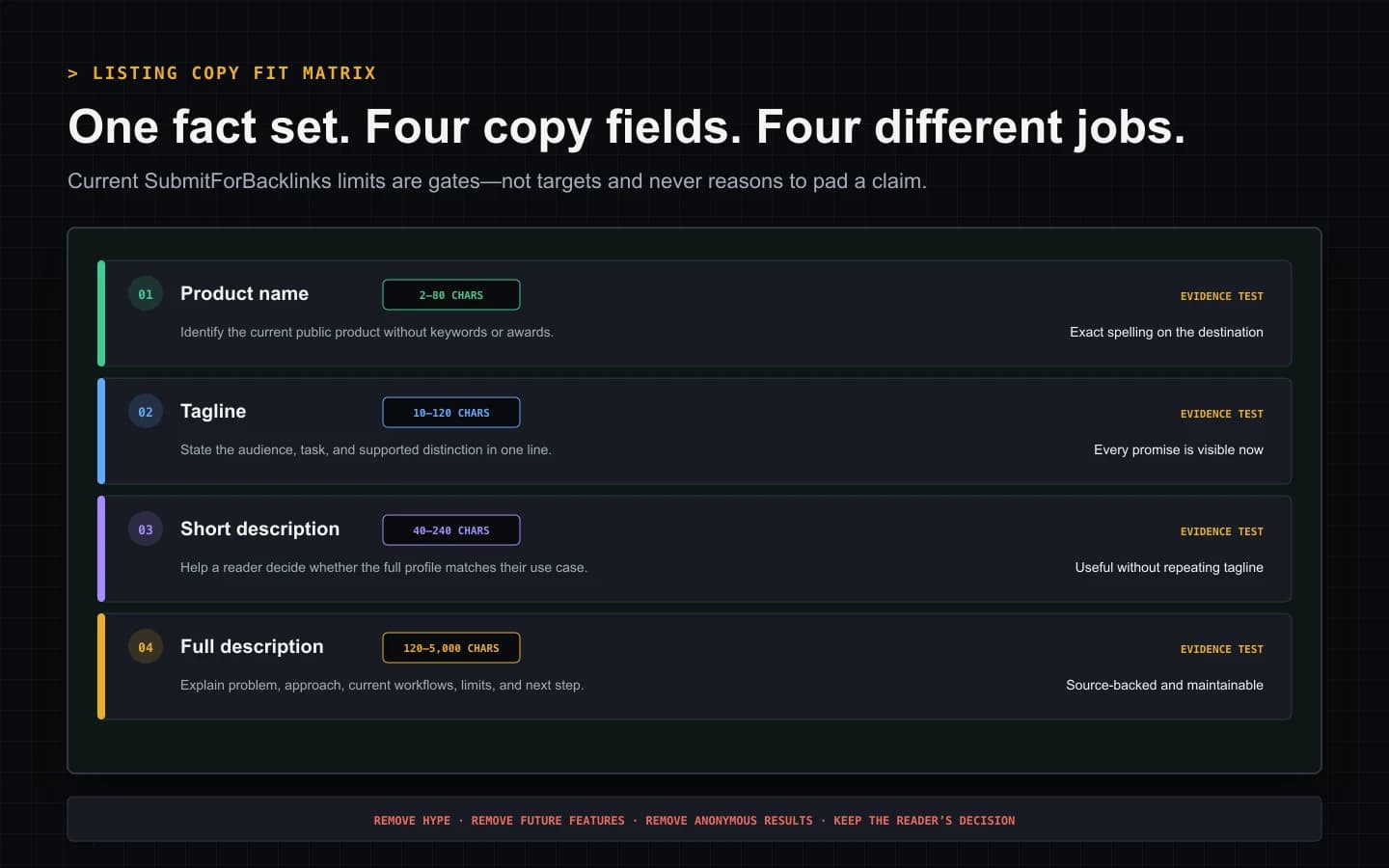
The product name is an identifier. Use the current public spelling without adding keywords, awards, pricing, or a tagline. The current form accepts 2–80 characters.
The tagline is the smallest useful promise: audience or task, product approach, and a concrete distinction that the destination supports. SubmitForBacklinks accepts 10–120 characters. Remove “best,” “revolutionary,” “guaranteed,” and claims that cannot be checked.
The short description helps a reader decide whether to open the full profile. In the current form it is 40–240 characters. State what the product does, for whom, and the primary use case. Do not repeat the tagline word for word.
The full description supplies the evidence missing from the shorter fields. The current range is 120–5,000 characters. A useful structure is:
- audience and recurring problem;
- how the product approaches that problem;
- two or three current workflows or capabilities;
- limits, availability, or prerequisites that affect the decision;
- the next step on the destination page.
Google's people-first questions ask whether content serves an intended audience, shows first-hand expertise, adds useful information, is trustworthy, and helps someone achieve a goal. Use those questions to edit the copy. They do not provide a formula for approval or ranking.
Read every field aloud next to the live product. Correct tense, unsupported counts, stale integrations, invented customer claims, and future features written as available. Copy should be consistent without being duplicated.
Choose discovery fields by the primary customer job
Choose the primary category from the job a customer hires the product to do, not the technology used to build it. If the product is an invoicing workflow with an AI helper, invoicing may be the primary category while AI is a tag. A secondary category is optional and should represent a real second use, not a visibility tactic.
Tags should help a visitor narrow the use case. The current contract requires one to five tags, each 2–30 characters. Prefer durable nouns or workflows over competitor names, promotional phrases, and every adjacent category.
Then verify the controlled fields:
- Product type: SaaS, AI tool, developer tool, API, template, marketplace, or another currently offered choice that describes the product itself.
- Platform: web, iOS, Android, desktop, browser extension, API, or multi-platform based on what is publicly available now.
- Pricing: free, freemium, paid, subscription, usage based, open source, or one-time according to the current buying model.
Inspect several live product listings before choosing. Use their field structure to understand the directory, not to copy another company's claims or force a category that does not fit.
Prepare media that proves the current product
Media is optional in the current browser form. If supplied, it accepts JPEG, PNG, or WebP files up to 5 MB each, one logo, and up to three screenshots. Stored images are normalized, but processing cannot correct inaccurate or misleading source material.
Use the current production logo with sufficient contrast and safe padding. Choose screenshots that show real interface states, not three nearly identical hero slides. Remove account emails, access tokens, customer records, financial data, private workspaces, and browser extensions you do not intend to disclose. Zoom each image at full size and on a narrow viewport. Check crop, legibility, dates, product name, and feature state.
The SubmitForBacklinks quick safety check currently scans submitted text and the website for clear risks; the interface explicitly says images are not reviewed by that scan. The submitter remains responsible for image accuracy, privacy, and permission.
Keep a short text-alternative note beside each reusable image even when a particular form does not request it. W3C WAI says an informative image's text alternative should convey its meaning or content, not merely list visual details. A note such as “Workflow dashboard showing an approval waiting for an owner” is more useful than “screenshot.”
Confirm ownership, contact, and launch facts
The founder or submitter name identifies the accountable person; it is not an invitation to impersonate a founder. Use a monitored contact email that can receive questions after submission. Company, social URL, and launch date are optional in the current form, but when supplied they must agree with the product record.
Confirm that the submitter can represent the product, has permission to use the media and public claims, and knows who can correct the listing. Remove personal data that does not belong on a public profile.
For a submitted Free listing, choose an available launch week before review. Availability is live inventory, so a date saved in an old template may no longer be selectable. Featured intent does not use the Free weekly reservation. Neither route removes the need for accurate facts and moderation.
Make the listing-plan and link-policy decision consciously
As of August 17, 2026, the browser form presents Free and a one-time $8.99 Featured option. Free submission requires an available launch week and acknowledgement that badge verification is required for the product's current dofollow treatment. Featured skips that badge and launch-week requirement, but Featured never bypasses review and paid entitlement depends on successful owner payment.
Current owner-selected behavior gives standard-link treatment to valid paid Featured listings and active verified reciprocal Free listings. Other Free listings use nofollow. This is product behavior, not Google approval and not a promise of ranking credit.
Google's spam examples include paid links for ranking purposes, excessive
exchanges, automated link creation, low-quality directory links, distributed
template links, and low-value content made mainly to manipulate linking
signals. Google recommends sponsored for advertisements and paid placements,
with nofollow still accepted.
Record the real relationship and your risk decision before selecting a plan. Do not describe payment or a reciprocal badge as editorial endorsement. The dofollow and nofollow guide explains delivered attributes, while the badge verification guide covers the current reciprocal workflow.
Review assisted copy and required confirmations
The current browser flow can scan a public product site and fill blank fields. Existing answers remain unchanged. Treat the result as a draft: compare every name, category, price, capability, URL, and description with the dated product record.
Before sending, the current form requires agreement to the submission guidelines, confirmation that the submitter can represent the product, and confirmation that the prepared content was reviewed. The guidelines require a real product or public preview, people-first copy, accurate optional media, authorization, and moderation. Review can result in edits, requests for changes, rejection, or later removal.
Automation changes the input method, not the evidence standard. If an agent or scan produced the text, a person still owns the claims and final decision.
Run the seven-gate preflight
Mark a gate pass only when the evidence is visible:
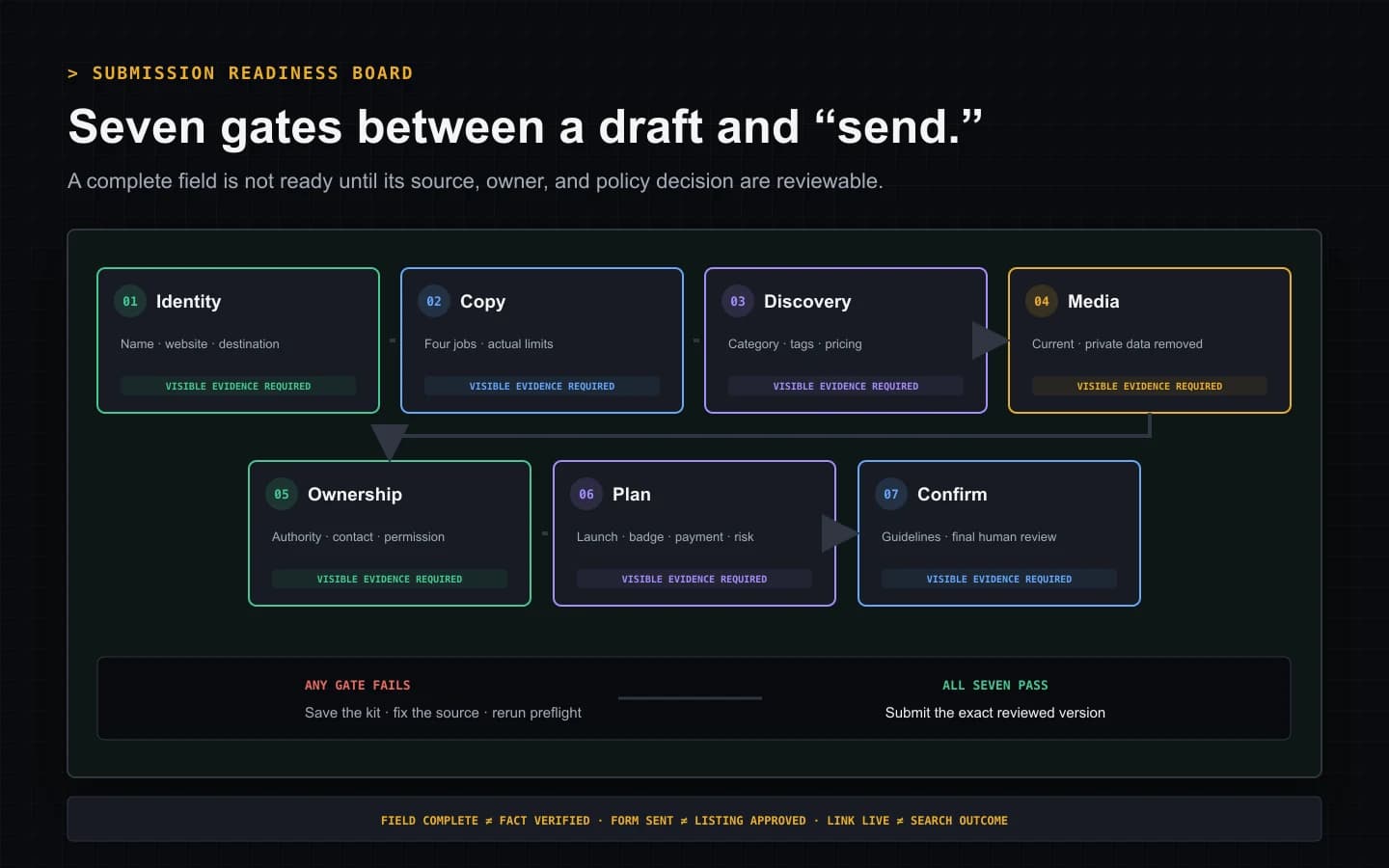
| Gate | Pass evidence | | --- | --- | | Identity | Product name, website, and company agree on the live destination | | Copy | Four fields fit their limits, differ in purpose, and contain no unsupported claim | | Discovery | Primary category, tags, pricing, platform, and type match current use | | Media | Files pass format and size rules and contain no stale, private, or misleading state | | Ownership | Authorized person, monitored contact, permissions, and correction owner are named | | Plan | Free or Featured requirements and the real link relationship are understood | | Confirm | Launch details, guidelines, generated copy, and every required acknowledgement were reviewed |
If any blocking gate fails, save the kit and fix the source. Do not substitute vague copy, a false category, an unrelated destination, or a checkbox the owner did not understand merely to complete the form.
If the destination has not been chosen, start with the sourced SaaS directory shortlist and verify current product fit first.
When all seven pass, open the submission form. Save the exact version sent, submission date, selected plan, requested launch week, and any editor response. After publication, compare the live copy, media, destination, anchor, and relationship with that record.
A useful checklist ends with evidence, not a green progress bar. Accurate preparation makes moderation and later corrections easier. It still cannot guarantee acceptance, publication, crawling, indexing, rankings, traffic, customers, authority, or link equity. Evaluate the directory itself with the directory quality framework and place the submission inside a measured SaaS backlink strategy, not a promised outcome.
SaaS Directory Submission Preflight
A 22-second preflight for preparing SaaS listing copy, discovery fields, media, ownership, plan details, and required confirmations.
Video transcript
Freeze one dated source-of-truth record with product name, canonical URL, preferred destination, pricing state, owner, and evidence date. Write the tagline, short description, and full description for distinct jobs and validate the current limits. Choose one primary category, a restrained tag set, and accurate product, platform, and pricing types. Inspect one current logo and up to three real screenshots; images are optional and the quick text safety scan does not review them. Confirm authorization and a monitored contact. Choose Free or Featured only after reviewing launch, badge, payment, and link-policy consequences. Read the guidelines and submit only when all seven blocking gates pass.
Sources and verification
Product behavior was checked against the current implementation and automated tests. External policy sources are linked directly.
- Google guidance for creating helpful content — checked July 30, 2026
- Google guidance for crawlable links and anchor text — checked July 30, 2026
- Google Search spam policies: link spam — checked July 30, 2026
- Google guidance for qualifying outbound links — checked July 30, 2026
- W3C guidance for informative images — checked July 30, 2026
- SubmitForBacklinks submission guidelines — checked July 30, 2026
Put the workflow into practice
Use the guided terminal flow or review the supporting documentation before submitting a product.
Related resources
Backlinks for a New SaaS: What to Pursue First
Prioritize realistic backlinks for a new SaaS using launch readiness, relationship proximity, reviewed profiles, verification, and policy-aware limits.
Open resourceHow to Promote a SaaS Product Without Betting on One Channel
Promote a SaaS product across owned, community, partner, directory, lifecycle, and paid channels with clear roles, attribution, and no growth guarantees.
Open resourceHow to Build a SaaS Backlink Strategy You Can Measure
Build a SaaS backlink strategy around audience fit, linkable evidence, source relevance, policy risk, attribution, and measurable business outcomes.
Open resourceAre Directory Backlinks Good for SEO? Use This Quality Test
Learn when directory backlinks are useful, how to inspect relevance, editorial controls, crawlability, paid-link treatment, and spam risk.
Open resourceDofollow vs Nofollow Backlinks: What Actually Changes
Compare dofollow and nofollow backlink HTML, sponsored and UGC values, Google’s hint model, and a repeatable way to inspect real links.
Open resource