Agent submission guide
How to Submit a SaaS Listing With an AI Agent
Automate the repetitive parts of a product submission without automating away ownership, consent, or editorial review.
- Reviewed by
- SubmitForBacklinks Editorial Team
- Published
- Updated
- Checked
The short answer
You can submit a SaaS product with an AI agent by running one command, approving one browser sign-in, and pasting the product URL. SubmitForBacklinks scans the public website, prepares the listing fields, and shows them in the terminal before anything is submitted. You then choose a Free launch week or a Featured listing and confirm the reviewed draft.
The useful part is not merely generating a description. The workflow keeps the scan, owner review, listing choice, submission, and next action connected. A Free submission opens badge setup after it is saved. A Featured submission opens the secure one-time checkout. Both paths still go through editorial review.
curl -fsSL https://submitforbacklinks.com/install.sh | sh
This guide explains the complete owner journey. If you need flags and command reference rather than the broad workflow, use the terminal quickstart. If you are integrating a service, use the agent API reference or MCP integration guide.
Who should use this workflow
The terminal flow is designed for a founder, employee, agency, or authorized agent operator who can accurately represent the product. It is a good fit when you already have a public SaaS website and want to avoid retyping its name, tagline, pricing model, platform, category, and supporting description into a long directory form.
It is not a way to submit unrelated products without permission. The agent can read public pages and propose structured fields, but it cannot know whether you are authorized to act for the company. It also cannot make legal attestations, guarantee editorial approval, or promise that a backlink will improve rankings, traffic, indexing, or a third-party Domain Rating score.
That separation matters. Automation should remove repetitive collection work while leaving representation, accuracy, plan selection, and submission in the user’s hands.
What the AI agent scans
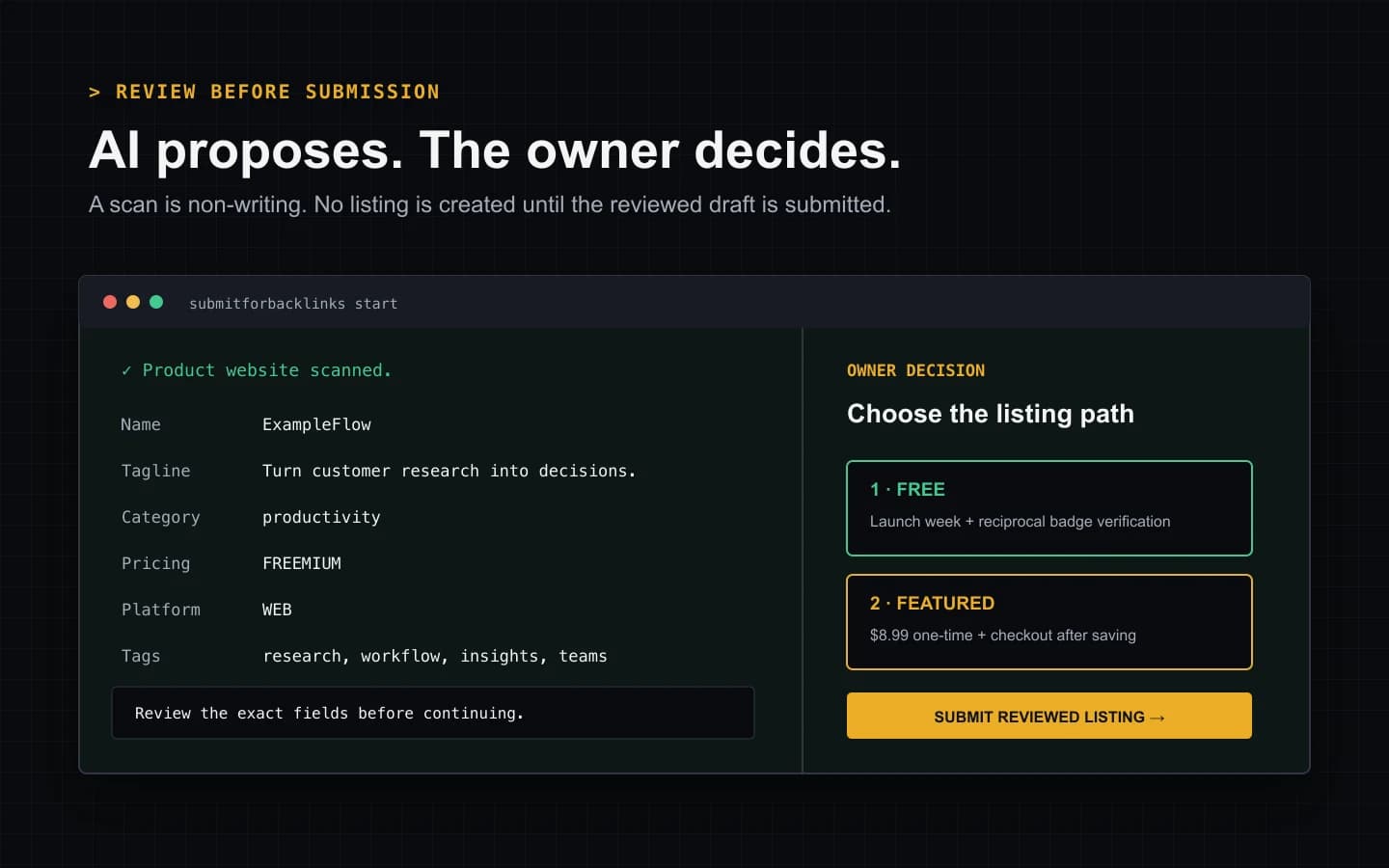
The scan reads the public product URL and prepares a draft from information it can retrieve. The terminal shows the proposed product name, tagline, category, pricing model, platform, and tags. The saved submission also contains the reviewed descriptions and other structured listing fields required by the service.
A scan is non-writing. It does not create a listing, reserve a launch slot, or claim the product domain. That makes it safe to inspect the result and stop if the website is incomplete, the category is wrong, or the copy does not accurately describe the product.
The scan is also not a private-site crawler. The URL must resolve to a public HTTPS website the service can safely fetch. Pages behind a login, blocked by network controls, or unavailable to the scanner may produce limited results or an actionable error.
A tested five-stage submission
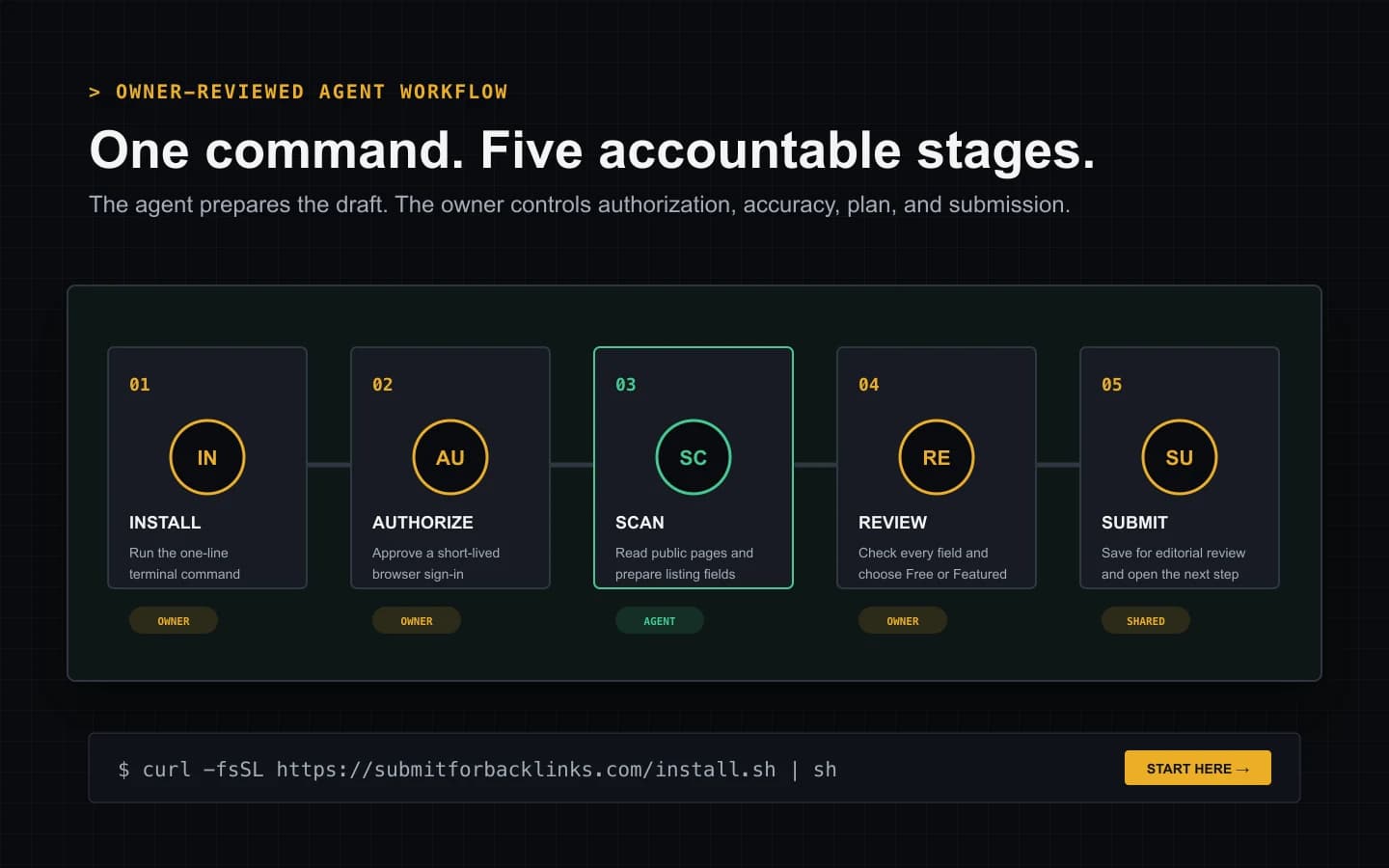
We checked the sequence below against the current CLI implementation, its unit contract, the browser authorization flow, and the owner-scoped submission API on July 30, 2026. The visual above maps the same five stages without hiding the human decision points.
1. Install or update the CLI
Run the one-line installer in a macOS or Linux terminal. It downloads the current checksum-verified release used by the public CLI page and starts the guided flow. Re-running the installer is also the recovery path when an older local client is no longer compatible with the service.
The command is intentionally short so a person can inspect the hostname before running it. If your environment blocks shell installers, the CLI documentation provides the direct download and checksum workflow.
2. Authorize the terminal in the browser
If the terminal does not already hold a valid credential, it requests a short-lived authorization session and opens the verification page in the default browser. Sign in to the SubmitForBacklinks account that should own the submission, then authorize that terminal.
The terminal polls only for the result of that specific authorization request. After approval, it stores the issued credential in its local configuration with owner-only file permissions. The normal guided path does not ask the user to copy an API key, enter a second email code, create an environment file, or paste the browser result back into the terminal.
The browser page tells the user when approval is complete and that it is safe to return to the terminal. If automatic browser opening is unavailable, the same short-lived URL is printed for manual opening. Authorization expires after 15 minutes, so an abandoned request cannot remain usable indefinitely.
3. Paste and review the product URL
The terminal asks for Product URL: and normalizes a bare domain to HTTPS.
After the scan, it prints Product website scanned and shows a compact field
summary. This is the most important review point in the flow.
Check whether the name matches the brand, the tagline describes the actual outcome, the category reflects the primary use case, and the pricing and platform values are current. Tags should help a visitor understand the product; they should not be a list of unrelated search phrases. If the result is inaccurate, stop and improve the public website or use the browser form to edit the fields before submission.
The supporting image later on this page shows the boundary clearly: scanned fields appear first, and the plan and submission decision remain separate.
4. Choose Free or Featured
The Free path reserves one of the launch weeks currently reporting available capacity. The terminal lists up to four available weeks with their remaining spots and lets you accept the next week or choose a later one. After submission, it opens the badge setup section for that saved record.
For a Free listing, reciprocal-badge verification activates the implemented dofollow treatment after publication. The badge must be installed on a public HTTPS page on the submitted product domain and remain verifiable. Read the badge verification guide before choosing this path so the requirement is not a surprise.
The Featured path is an $8.99 one-time purchase. It skips the reciprocal badge and weekly queue, and the terminal opens Stripe Checkout immediately after saving the Featured-intent submission. Payment does not bypass moderation. Approval activates the permanent Featured listing under the current product policy; a paid submission that is rejected enters the automated refund workflow.
SubmitForBacklinks currently implements unqualified links for approved Featured listings and verified reciprocal-badge entitlements. Google’s spam policies identify paid links that pass ranking credit, required link exchanges, and automated link creation as potential link-spam patterns. The product owner has accepted that policy risk. Neither option should be interpreted as Google approval or a guaranteed SEO result.
5. Submit and follow the next action
The final terminal prompt defaults to yes when you press Enter, but it still states what you are confirming: you reviewed the listing, can represent the product, and accept the applicable guidelines and plan terms. The API then saves the exact reviewed fields with a new idempotency key so an uncertain network retry cannot silently create a second mutation.
On success, the CLI prints the selected launch week or Featured state and a submission URL. It also tries to open the immediate next step. Free opens badge setup; Featured opens checkout. If the operating system cannot launch a browser, the terminal prints an OSC 8 hyperlink where supported and a normal URL everywhere else.
The submission page is the durable place to monitor editorial status, correct the listing when permitted, install or re-verify a badge, and continue a Featured payment. The terminal is the fastest entry point, not a replacement for the owner dashboard.
What happens after submission
Every submitted record enters the same editorial system whether it originated in the browser, CLI, REST API, or MCP. The interface does not create a separate class of agent-owned listings. The account that authorized the terminal owns the record and can manage it from the normal dashboard.
Moderation can approve, request changes, reject, flag, or remove a listing under the published guidelines. Automated safety checks can route a submission to manual review, but they do not publish a high-risk result by themselves. Featured changes placement and link entitlement after approval; it does not purchase an editorial decision.
For a Free submission, approval and badge verification are distinct events. A badge installed before publication can be recognized, but follow treatment begins only when the listing is both live and verified. The current verified window is 60 days and daily rechecks can remove dofollow treatment when valid markup is definitively missing. Network failures retry rather than immediately punishing the listing.
Common failure states and recovery
The installer cannot run. Confirm that the machine has a supported shell
and can reach submitforbacklinks.com. Use the checksum-based download on the
CLI page when piping a script is prohibited.
The browser did not open. Copy the authorization URL printed in the terminal. Complete it before the 15-minute expiry, then return to the still running command.
The scan fails or returns weak fields. Verify that the product has a public HTTPS homepage with clear product copy. A scan cannot reliably infer missing pricing, positioning, or audience details from an empty landing page.
The domain is already represented. Open the existing owner record instead of trying to create a duplicate. If a listing was permanently deleted through the supported owner or admin action, its product identity is released for a later legitimate submission.
No Free launch week is available. Wait for new capacity or choose Featured. The CLI does not invent a reservation when the availability endpoint reports none.
Checkout or badge setup does not open. Use the printed submission URL. The saved record remains the source of truth even when a desktop browser launcher is missing.
A practical review checklist
Before accepting the terminal prompt, verify five things:
- The URL is the canonical public product website and uses HTTPS.
- The name, tagline, descriptions, category, pricing, platform, and tags are accurate rather than merely plausible.
- You are authorized to represent the product and maintain the listing.
- You understand the badge requirement for Free or the one-time payment and review conditions for Featured.
- You are comfortable sending the exact displayed draft to editorial review.
This checklist is deliberately short. A good agentic submission should save time without making the resulting directory less trustworthy. Google’s people-first content guidance similarly emphasizes useful, reliable material created for people rather than pages produced primarily to manipulate search visibility.
The outcome to expect
At the end of the workflow, you have a saved, owner-scoped product submission; a selected Free launch week or a pending Featured checkout; and a direct path to the next required action. You do not yet have guaranteed publication, indexing, traffic, rankings, or authority growth.
That is the right contract for an AI-assisted directory submission. The agent does the repetitive extraction, the user reviews the facts and chooses the commercial path, and the directory retains editorial control.
Submit a SaaS With an AI Agent
A 20-second first-party walkthrough of terminal authorization, website scanning, owner review, and the Free or Featured next step.
Video transcript
Run the one-line SubmitForBacklinks command. Approve the short-lived terminal sign-in in your browser, then return to the terminal. Paste the public SaaS URL and let the scanner prepare the listing fields. Review the name, tagline, category, pricing, platform, and tags. Choose a Free launch week with reciprocal-badge setup or choose Featured and continue to the one-time checkout. The saved submission remains in your owner dashboard for editorial review and the next required action.
Sources and verification
Product behavior was checked against the current implementation and automated tests. External policy sources are linked directly.
- SubmitForBacklinks terminal and CLI documentation — checked July 30, 2026
- SubmitForBacklinks agent OpenAPI contract — checked July 30, 2026
- SubmitForBacklinks submission guidelines — checked July 30, 2026
- Google Search spam policies — checked July 30, 2026
- Google guidance for helpful, reliable, people-first content — checked July 30, 2026
Put the workflow into practice
Use the guided terminal flow or review the supporting documentation before submitting a product.
Related resources
How Automated Backlink Submission Should Work
Learn which backlink submission tasks to automate, which controls need human review, and how idempotent retries prevent duplicate actions.
Open resourceHow AI Agent Directory Submission Works
See how an AI agent discovers capabilities, uses scoped authorization, saves an owner draft, submits reviewed fields, and handles each result.
Open resourceHow to Submit a Backlink From the CLI
Install the CLI with one command, scan and review your SaaS listing, choose Free or Featured, and recover cleanly if the browser handoff fails.
Open resourceHow to Verify a Dofollow Backlink for a Free Listing
Install the reciprocal badge, verify the live page, diagnose failures, and understand the fixed 60-day dofollow window and daily rechecks.
Open resource