Agent lifecycle and permissions
How AI Agent Directory Submission Works
A useful directory agent has enough authority to remove repetitive work while keeping every owner decision, state change, and editorial handoff observable.
- Reviewed by
- SubmitForBacklinks Editorial Team
- Published
- Updated
- Checked
Direct answer: the agent submits a product, not itself
“AI agent directory submission” can mean two different things. A founder may want to list an AI agent as the product, or an operator may want an AI agent to prepare and submit another product to a directory. This guide covers the second job: delegating a product-listing workflow to software without giving that software unlimited authority.
A controlled agent can discover the service contract, obtain scoped authorization, scan a public product website, save an owner-scoped draft, submit reviewed fields, and read the resulting status. The service still needs an authenticated account for owner actions, explicit attestations for a direct submission, and independent editorial review before publication.
That is more precise than saying an agent “gets a backlink.” The immediate output is a traceable directory submission owned by one account. Publication, link treatment, payment, badge verification, indexing, and search performance are separate states or outcomes.
Start with machine-readable discovery
An agent should not begin by guessing endpoints from a marketing page. SubmitForBacklinks publishes two discovery surfaces:
- the capabilities endpoint describes the current API version, authentication options, scopes, limits, listing types, required attestations, and endpoint paths; and
- the OpenAPI document defines request bodies, responses, status codes, error envelopes, security requirements, and idempotency headers.
The distinction is useful. Capabilities answer “what is available right now?” The OpenAPI contract answers “how do I call it?” A client can check the current CLI compatibility range or whether anonymous scanning is allowed before it collects user input. A developer can then validate the exact schema instead of hard-coding assumptions about fields or routes.
Authorization is not one all-powerful permission
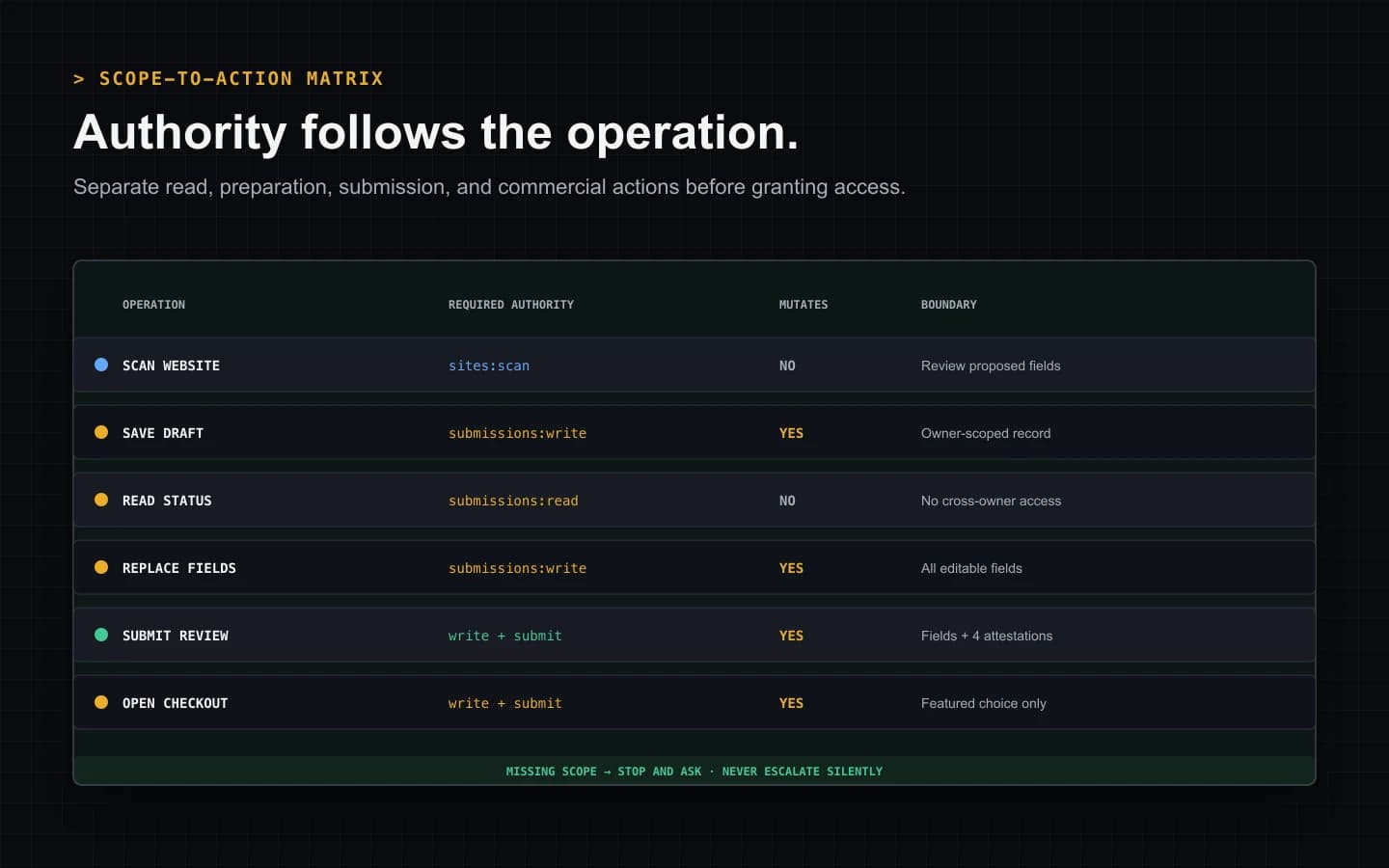
The current agent contract separates authority into four scopes:
sites:scanpermits public website scanning.submissions:readpermits owner-scoped listing reads.submissions:writepermits draft creation, edits, checkout creation, and badge operations where the endpoint requires them.submissions:submitpermits sending reviewed content to moderation.
The default guided credential includes the supported workflow scopes, but the separation still matters for manual keys. Reporting may need only read access. Preparation may need scan and write access without permission to submit.
A missing scope returns an authorization error; it should not be treated as a reason to request a broader credential automatically. The person configuring the integration should see which operation was blocked and decide whether that authority is appropriate.
The easiest user-facing authorization path is the guided terminal sign-in. The CLI opens a short-lived browser page, the signed-in user approves the terminal, and the issued bearer credential is stored locally without being printed. Dashboard-created keys remain available for CI or team integrations. In both cases, the credential identifies the account that owns later records; it does not certify that every inferred product claim is true.
Scan, draft, and submit are different mutations
A reliable agent treats the lifecycle as separate stages rather than one opaque action.
Scan proposes fields without creating a listing
The scan endpoint accepts a public product URL and returns a proposed draft.
It can be called anonymously, or with a credential carrying sites:scan. The
result may contain a name, tagline, descriptions, category, tags, pricing
model, platform, and product type derived from the public website.
Scanning is deliberately non-writing. It does not reserve a launch week, create a submission, claim a domain, purchase Featured placement, or publish a page. The caller can discard an inaccurate scan without leaving a database record.
Draft creation creates an owner-scoped record
An authenticated caller can create a draft with submissions:write. Complete
reviewed overrides can be saved directly. If the caller supplies partial or no
overrides, the workflow may scan the product website first and therefore also
needs sites:scan.
A draft is useful when the agent prepares data but a person will edit or approve it later. It has a durable identifier and can be read only by the owning account or an administrator through the appropriate interface. Saving a draft is not editorial submission.
Direct submit adds a stricter boundary
Sending a new listing directly to review needs both write and submit scopes, a UUID idempotency key, every reviewed listing field, and four affirmative attestations. Those attestations cover the guidelines, the applicable badge requirement, authority to represent the product, and review of generated content.
An API client cannot replace these fields with a vague confirmed: true.
Making the decisions explicit keeps the request auditable and lets the server
reject an incomplete representation before moderation work is queued.
An existing draft can also be finalized later. Finalization requires the submit scope, a fresh mutation key, the attestations, and an available launch week for the Free path when the service does not select one automatically.
One owner-scoped lifecycle, tested end to end
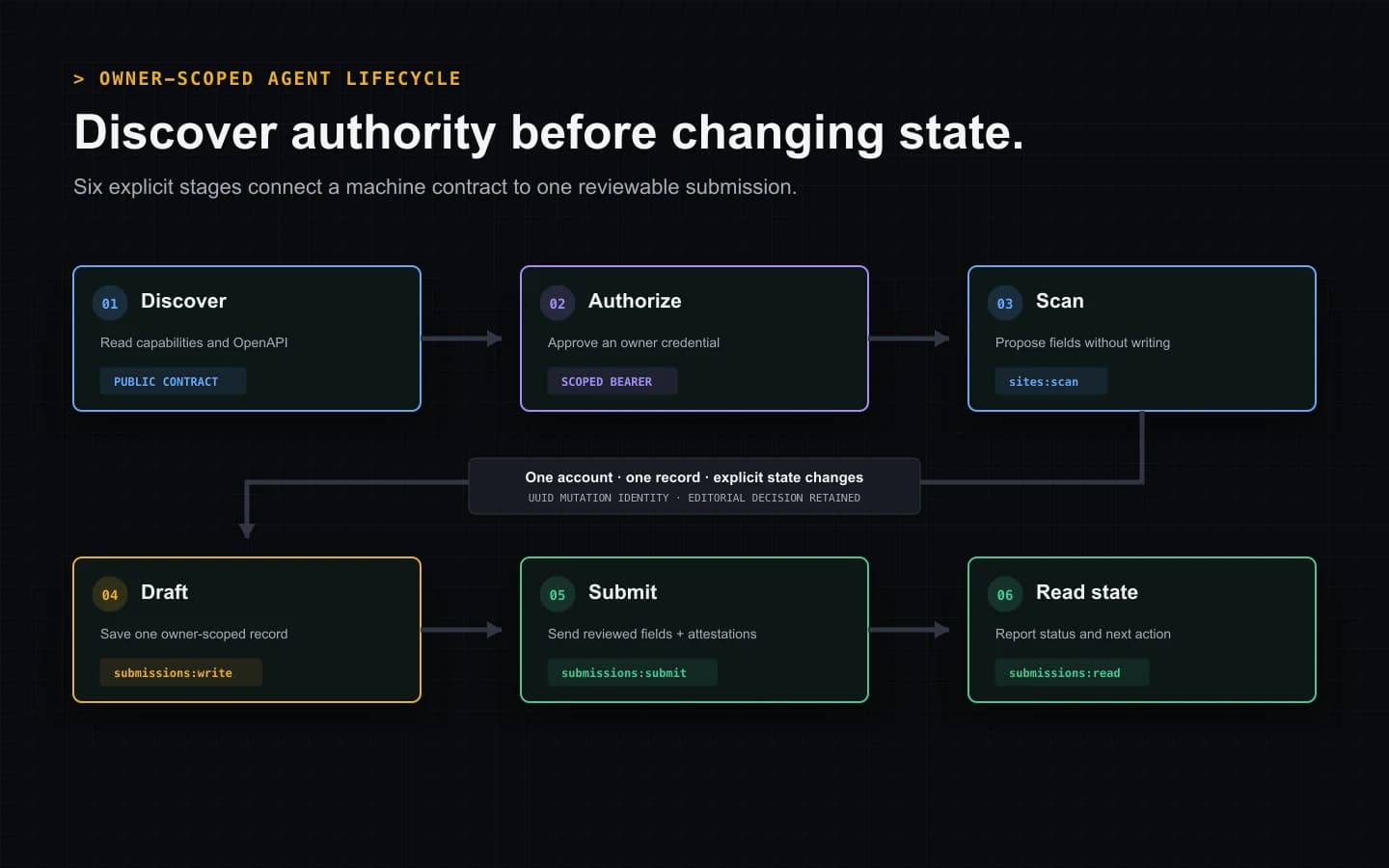
The lifecycle diagram above is based on the current contract and the database-backed integration suite. A representative sequence looks like this:
- Read capabilities and the OpenAPI version.
- Authorize a credential with only the scopes the client needs.
- Scan the public product URL and show the proposed fields.
- Save an owner-scoped draft with a new UUID idempotency key.
- Read the draft through the same owner account.
- Replace the editable fields when corrections are needed.
- Finalize the reviewed record with explicit attestations.
- Poll or fetch the resulting submission state.
The integration test proves more than a happy-path response. It checks that another owner cannot read or mutate the record, a conflicting retry is rejected, finalization can be replayed safely, and the saved submission and operation outcome commit together.
That atomic boundary matters after a network interruption. If a client sends a mutation and loses the response, it repeats the identical request with the same key. A completed operation returns its stored outcome. Different content cannot reuse that key, and a distinct edit receives a new key. The agent does not need to guess whether a second listing was created.
Understand the states an agent will read
The submission status can move through DRAFT, SUBMITTED,
UNDER_REVIEW, NEEDS_CHANGES, APPROVED, REJECTED, FEATURED, or
ARCHIVED. Not every record visits every state.
DRAFT means the owner has a saved record that has not entered review.
SUBMITTED and UNDER_REVIEW indicate moderation work. NEEDS_CHANGES
returns the record to an editable correction path. APPROVED reflects an
accepted submission, while publication and launch timing may still be
represented in the linked listing data. FEATURED reflects the applicable
paid placement state. REJECTED and ARCHIVED are terminal or inactive
outcomes for the normal submission flow.
An agent should display these names as workflow state, not rewrite them into promises. “Approved” does not mean Google indexed the page. “Featured” does not mean a ranking improved. “Submitted” does not mean an editor accepted the listing.
Owner list reads return records by most recent update, with an opaque cursor for the next page. The default page size is 50 and the current maximum is 100. A client should preserve the returned cursor exactly rather than decode it or construct its own. Because editing a record changes its position, this is an activity feed, not a permanent creation-order archive.
Errors should change the next action
The API error envelope contains a stable code, a human-readable message, and
optional machine-readable fields. Temporary responses can also include
Retry-After. An agent should map those signals to a small set of behaviors.
Correct the request. Validation, missing category, missing attestation, and invalid badge-target errors require a field or user decision to change. Repeating the same body will not help.
Request deliberate authority. Authentication and insufficient-scope errors require sign-in, key replacement, or a conscious scope change. They must not trigger silent privilege escalation.
Wait and replay safely. An in-progress operation, scan reservation, or bounded verification cooldown may be retryable. Preserve the original idempotency key only for the identical mutation and respect a supplied delay.
Open the durable record. Duplicate-domain, unavailable launch-week, checkout, or moderation outcomes often need a dashboard action or a different commercial choice rather than another automated request.
Stop on a terminal business outcome. Rejection, an uneditable state, or a deleted record should be reported clearly. A loop that keeps submitting after an explicit business decision is not resilient automation.
The scope-to-action matrix later on this page summarizes these boundaries. It is intentionally different from a generic “retry every failure” strategy.
Choose the right interaction channel
The same owner lifecycle can be reached through several channels, but they serve different users.
Guided terminal
Choose the terminal when a person wants the fastest complete path. It performs browser authorization, asks for the product URL, shows scanned fields, offers Free or Featured, and opens badge setup or checkout after submission. It is the best starting point for one product because the review and handoff are visible.
MCP tools
Choose MCP when an agent host already supports tool discovery and a person wants the agent to work through named operations inside that environment. The MCP server should still use the same owner authorization and service rules. Tool calls do not remove the need for truthful fields, appropriate scopes, or editorial review.
REST API
Choose REST when building a service, CI workflow, or custom interface that must control requests, idempotency keys, pagination, and error handling directly. This path offers the most control and therefore creates the most implementation responsibility. Validate against the published OpenAPI document rather than copying example payloads indefinitely.
The browser dashboard remains the durable surface for media, corrections, moderation, badge setup, billing, and deletion.
Free and Featured remain explicit choices
A Free submission reserves an available launch week. Under the current product policy, a verified reciprocal badge activates time-limited dofollow treatment after publication. The badge must remain verifiable, and its state can be inspected or rechecked through the supported owner channels.
A Featured-intent submission skips the weekly queue and badge requirement. It opens an $8.99 one-time Stripe Checkout before editorial review. Successful payment does not force approval; a rejected paid submission enters the refund workflow. Approval activates the current permanent Featured entitlement.
SubmitForBacklinks currently implements standard outbound links for approved Featured listings and active verified reciprocal-badge entitlements. Google’s spam policies list automated link creation for ranking manipulation, paid links that pass ranking credit, and required link arrangements among link-spam examples. The product owner has accepted that policy risk. This page explains the current product behavior; it does not claim Google approval or guarantee indexing, rankings, traffic, Domain Rating, or link equity.
A least-authority checklist
Before allowing an agent to submit directory listings, verify:
- The client reads current capabilities and validates the published contract.
- Its credential contains only the scopes required for its actual operations.
- A scan remains separate from draft creation and editorial submission.
- Every material field is visible and reviewed before direct submission.
- Each distinct mutation receives a new UUID, while an identical retry keeps the original key.
- Owner-scoped records cannot be read or changed by another account.
- Error codes produce correction, authorization, retry, dashboard, or stop behavior instead of one generic loop.
- Free and Featured terms are shown before the final action.
- Editorial rejection remains possible regardless of channel or payment.
- The client makes no search-performance promise from a workflow state.
This checklist is the practical definition of controlled AI agent directory submission. The agent has enough authority to remove repetitive work, but not enough ambiguity to hide what it changed or who approved it.
Start with the guided terminal submission to see the owner handoff in one session. Use the agent documentation when you are choosing between MCP and REST. The expected result is one reviewable, owner-scoped submission with a known state and recovery path—not an untraceable batch of backlinks.
AI Agent Directory Submission Lifecycle
A 22-second first-party walkthrough of contract discovery, scoped authorization, non-writing scan, owner-scoped draft, explicit submission, and status reporting.
Video transcript
First, the client reads the machine-readable capabilities and OpenAPI contract. Next, an owner authorizes only the scopes required for the intended operations. A public website scan proposes normalized fields without creating a record. The write scope then saves one owner-scoped draft under a UUID mutation identity. Direct submission adds the submit scope, all nine reviewed fields, four explicit attestations, and independent editorial review. Finally, the read scope reports the saved state and the next action, such as correcting requested changes, opening Free badge setup, or continuing Featured checkout. No workflow state guarantees publication, indexing, rankings, traffic, Domain Rating, or link equity.
Sources and verification
Product behavior was checked against the current implementation and automated tests. External policy sources are linked directly.
- SubmitForBacklinks agent capability contract — checked July 30, 2026
- SubmitForBacklinks OpenAPI contract — checked July 30, 2026
- SubmitForBacklinks agent documentation — checked July 30, 2026
- SubmitForBacklinks submission guidelines — checked July 30, 2026
- Google guidance for helpful, reliable, people-first content — checked July 30, 2026
- Google Search spam policies — checked July 30, 2026
Put the workflow into practice
Use the guided terminal flow or review the supporting documentation before submitting a product.
Related resources
How to Submit a SaaS Listing With an AI Agent
Run one command, scan your SaaS website, review the listing, and submit it from your terminal with a clear Free or Featured next step.
Open resourceHow Automated Backlink Submission Should Work
Learn which backlink submission tasks to automate, which controls need human review, and how idempotent retries prevent duplicate actions.
Open resourceHow to Submit a Backlink From the CLI
Install the CLI with one command, scan and review your SaaS listing, choose Free or Featured, and recover cleanly if the browser handoff fails.
Open resource