Transactional REST integration
How to Use a Backlink Submission API
Create and track real product-listing requests—not backlink-index reports—while making authorization, mutation identity, owner action, and editorial state observable.
- Reviewed by
- SubmitForBacklinks Editorial Team
- Published
- Updated
- Checked
Direct answer: this API creates listings, not backlink-index reports
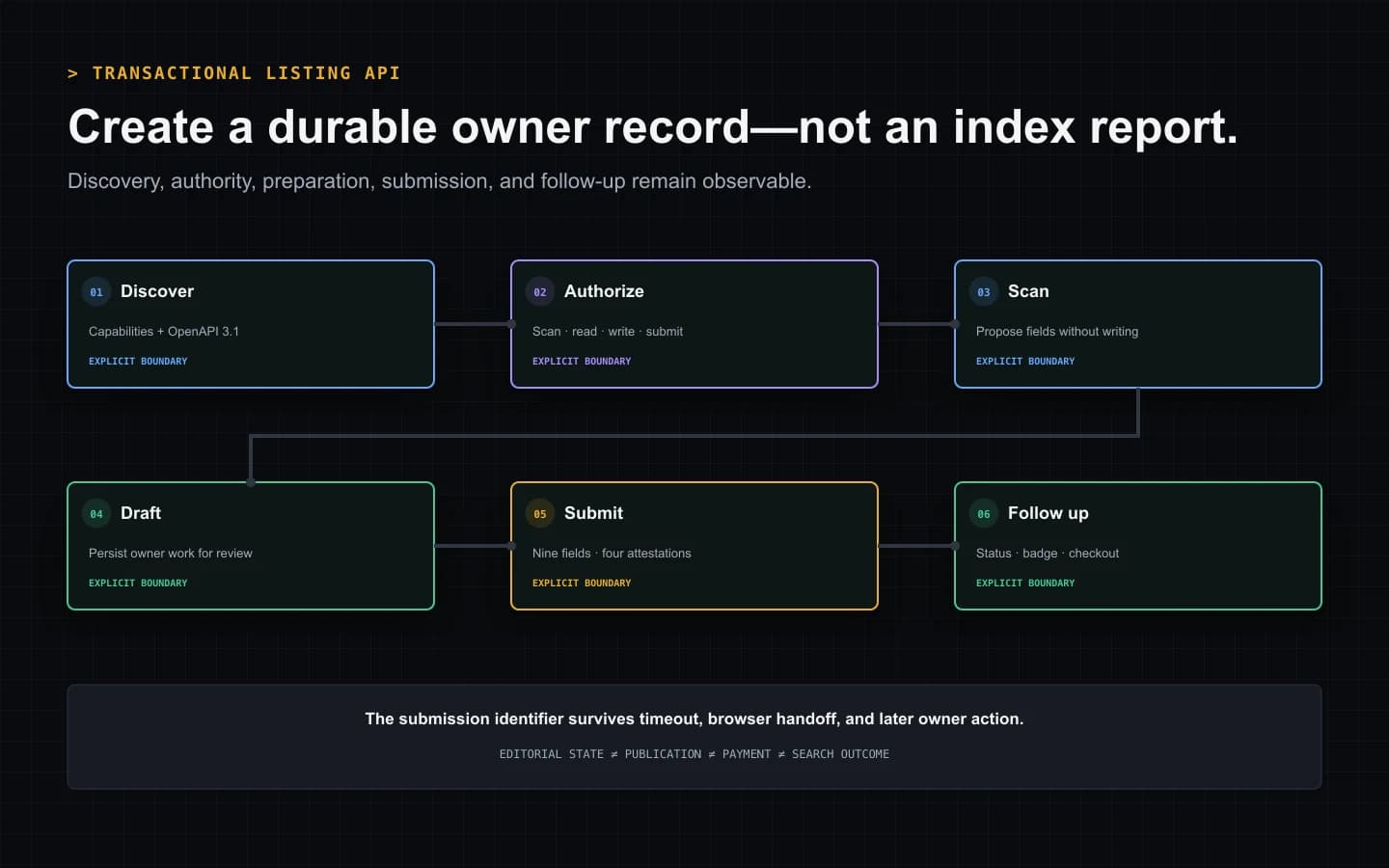
A backlink submission API can mean an analytics feed that reports discovered links, an indexing service, or a transactional interface that requests a new listing. SubmitForBacklinks provides the third kind. It lets an authorized owner application scan a public SaaS website, save or submit reviewed listing data, select Free or Featured, and follow the resulting moderation, checkout, or badge workflow.
The canonical contract is the OpenAPI 3.1 document at /openapi.json.
Capabilities are available separately at /api/v1/agent/capabilities. A
production client should inspect those documents, send an owner Bearer token
with the scopes needed by each operation, assign one UUID idempotency key to
each mutation meaning, and treat the returned submission as a durable state
machine.
The immediate result is not “a backlink was built.” It is a traceable owner record or an explicit failure. Editorial approval, publication, payment, launch timing, reciprocal-badge verification, link treatment, crawling, and search performance remain distinct events.
Discover policy before constructing a request
The capabilities endpoint answers product questions that do not belong in a hard-coded SDK constant: the current contract version, authentication methods, available scopes, supported listing types, attestations, limits, retention, and endpoint paths.
OpenAPI supplies the transport detail: body schemas, required headers, security, response statuses, and the structured error envelope. Reading both lets a client fail early when a contract is incompatible instead of collecting user consent and then discovering that its payload or credential cannot be used.
The current general agent request quota is published as unlimited. That does not mean every operation is unbounded. Reciprocal-badge verification has its own cooldown and network-safety controls, Free launch inventory has real capacity, and individual requests still have validation and size boundaries. Clients should read the capability value rather than convert “no general quota” into “retry any operation continuously.”
Give each component only the scopes it needs
Owner API keys can carry four current scopes:
sites:scanpermits authenticated public-site scanning and scan-derived preparation.submissions:readpermits owner-scoped list and detail reads.submissions:writepermits draft creation, edits, checkout creation, and supported badge mutations.submissions:submitpermits moving reviewed content into moderation.
A reporting job usually needs read access, not submission authority. A draft assistant may need scan and write access but no permission to finalize. A server that performs a full direct submission needs the relevant scan, write, and submit permissions.
Store the key in a server-side secret manager or another protected agent
credential facility. Do not expose it in browser JavaScript, source control,
query strings, prompts, logs, screenshots, or analytics. A 401 calls for a
valid credential. A scope error calls for a deliberate permission decision,
not an automatic request for every available scope.
Choose scan, draft, or direct submit
These paths have different side effects and should not be collapsed into one
generic submitUrl method.
Scan is a non-writing preparation step
POST /api/v1/agent/scan accepts a public product website and proposes
normalized listing fields. The result can help the owner review a name,
tagline, descriptions, category, tags, pricing, platform, and product type.
Scanning does not create a draft, claim the domain, reserve a launch week, start checkout, enter editorial review, or publish a product page. That makes it safe to reject an inaccurate interpretation before any durable listing mutation.
Draft creation preserves work without requesting review
POST /api/v1/agent/submissions with the draft action saves an owner-scoped
record. A client can provide the complete reviewed fields directly. If it asks
the service to derive missing fields from the site, the credential also needs
scan authority.
The response identifier is the durable handle for later reads and edits. Store that identifier with the local job record. Do not reconstruct ownership from the website hostname or assume that a scan identifier is a submission identifier.
Direct submit enters the editorial workflow
A direct submit uses the same collection route with submit action and requires write plus submit authority. It also requires every reviewed field:
- website URL;
- product name;
- tagline;
- short description;
- full description;
- category;
- tags;
- pricing model; and
- platform.
Four true attestations record acceptance of the guidelines, applicable reciprocal-badge terms, representative authority, and review of generated content. If the program cannot truthfully provide them, save a draft and send the owner to review. An API integration should never manufacture consent because a required Boolean exists in the schema.
Edit and finalize with separate operation identities
PATCH /api/v1/agent/submissions/{id} replaces the reviewed editable data on
an eligible owner draft. A correction is a new mutation and receives a new
UUID idempotency key.
POST /api/v1/agent/submissions/{id}/submit finalizes the reviewed record. It
requires submit authority, final attestations, and another UUID. The server
validates the current record state and the requested listing path before
committing the submission and operation outcome together.
Separating edit from finalize produces an auditable sequence: preparation, correction, then owner-authorized editorial handoff. It also prevents a client from interpreting “saved successfully” as “submitted successfully.”
Design idempotency before designing retries
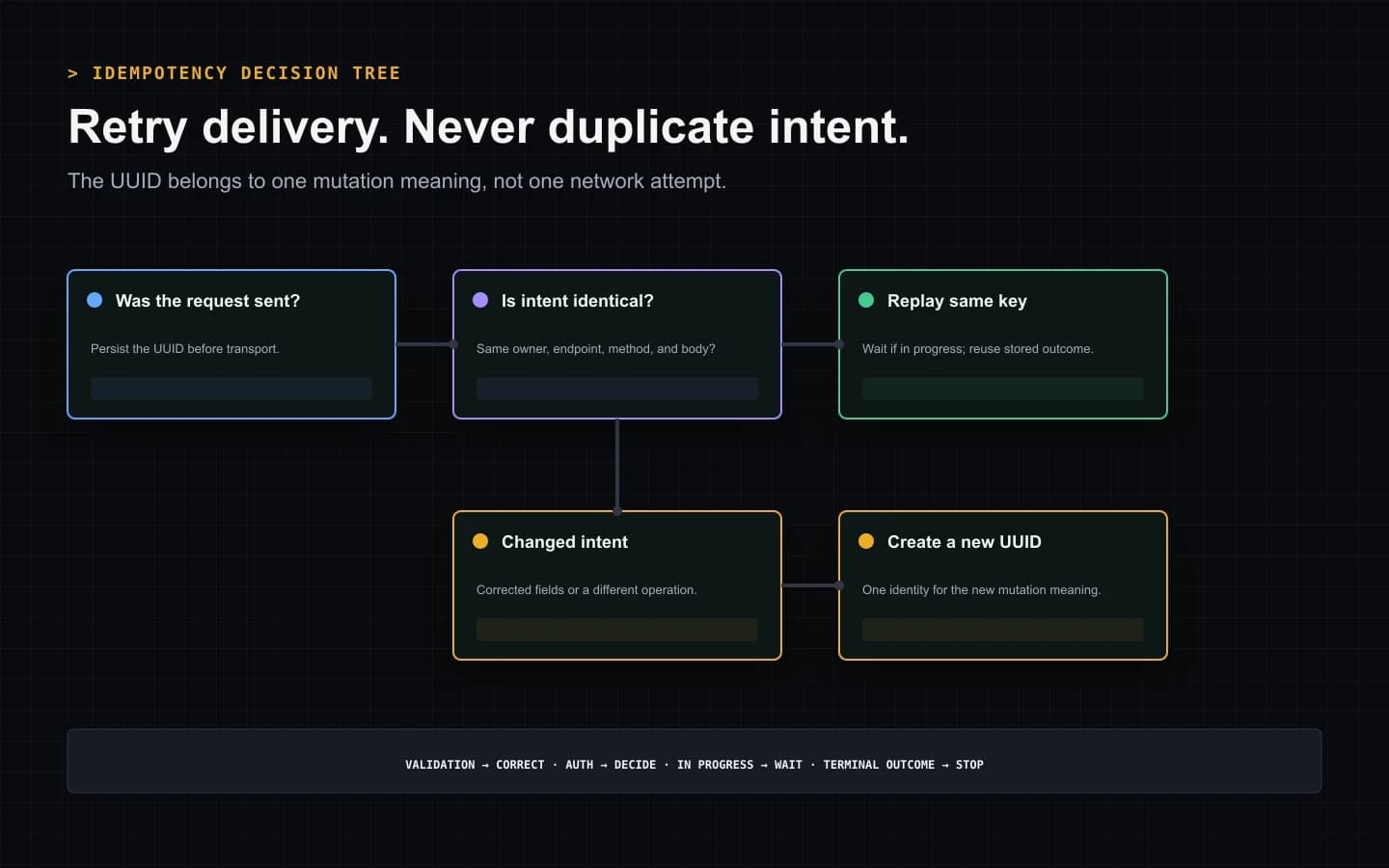
Every owner mutation that declares Idempotency-Key expects a UUID. Generate
one when the user or job creates a new mutation intent, and persist it before
sending the request.
When the response is lost, repeat the identical endpoint, method, body, owner, and key. A completed operation can replay its stored outcome and identify the replay in the response. An operation still in progress returns an explicit state rather than inviting a parallel write.
Never reuse that key with edited fields, a different submission, another endpoint, or another account. The service rejects changed input under a prior identity. Never generate a replacement key merely because the first request timed out; doing so removes the protection exactly when the outcome is uncertain.
A practical retry record stores:
- operation key;
- request fingerprint;
- endpoint and method;
- owner key reference, not the secret;
- first-attempt time;
- last HTTP status;
- replay indicator; and
- durable submission identifier when returned.
This local evidence lets an operator distinguish “not sent,” “sent with an unknown response,” “still processing,” “replayed successfully,” and “requires different input.”
Interpret the structured error envelope
Errors carry a stable machine code, a human-readable message, and optional
fields with the data needed for recovery. Some temporary responses also
include Retry-After. Route those signals into explicit behaviors.
Correct input for schema validation, missing reviewed fields, false attestations, invalid URLs, unsupported listing choices, and badge-target errors. The identical body will remain invalid.
Authenticate or authorize deliberately for missing credentials and insufficient scopes. Do not broaden a token silently.
Wait and replay identically for an in-progress mutation or an explicitly retryable temporary state. Preserve the operation key and honor the delay.
Open owner action for domain conflicts, unavailable Free weeks, requested changes, badge placement, checkout, or other browser-dependent steps.
Stop for deletion, rejection, an uneditable state, or another terminal business outcome. Resubmitting after an explicit moderation decision is not a recovery strategy.
Read lists and details without inventing pagination
GET /api/v1/agent/submissions returns owner records newest first. The default
limit is 50 and the maximum is 100. When the response includes a next cursor,
send that opaque value back exactly. It is not a page number and must not be
decoded or incremented.
GET /api/v1/agent/submissions/{id} is the primary recovery call after a
timeout or browser handoff. It returns the real owner record, its workflow
state, and relevant next action. Check it before creating a replacement
submission.
API states describe the directory workflow. DRAFT, SUBMITTED,
UNDER_REVIEW, NEEDS_CHANGES, APPROVED, REJECTED, FEATURED, and
ARCHIVED are not interchangeable with public availability or search-engine
status. Display the service state verbatim and explain the associated action.
Keep Free badge proof separate from publication
The badge endpoints support status, issue, and verify operations for an eligible owner submission. Issuing returns the exact reciprocal-badge evidence. It does not prove that the owner published that evidence.
Verification accepts a public HTTPS page on the submitted product domain and fetches it through SSRF-resistant network checks. The delivered markup must match the issued token, destination, badge asset, visibility, and accepted link relationship. A definitive later removal can return a Free listing link to nofollow; temporary network failures follow their own retry policy.
Clients should display the precise badge page and status, then link to the owner dashboard when markup installation or diagnosis is easier in a browser. API access does not eliminate the external act of changing the product site.
Start Featured checkout only for an eligible record
POST /api/v1/agent/submissions/{id}/featured-checkout creates the owner
checkout for an eligible Featured-intent submission. The returned HTTPS Stripe
URL is a browser action, not a payment confirmation.
Payment is collected before editorial review. The current Featured offer is a one-time purchase, skips the Free weekly queue and reciprocal badge, and activates its permanent listing entitlement after approval. A rejected paid submission enters the automatic refund workflow.
Store the submission identifier before opening checkout. If the browser fails or the user leaves, read the durable submission and billing state rather than creating another listing. Never accept an arbitrary redirect URL from model output; use only the server-returned secure destination.
Choose REST when your system owns the orchestration
The REST API fits a backend, CI process, bulk owner tool, or custom agent that needs precise control over credentials, bodies, UUIDs, retries, pagination, and errors. That control creates implementation responsibility.
Choose MCP directory submission when a compatible host should discover named tools and present them inside an agent conversation. Choose the guided CLI when a person wants the shortest one-product workflow with built-in browser authorization and next-step handoff.
Do not copy a sample request into a permanent client and treat it as the contract. Generate types or validate requests against the current API reference and machine-readable OpenAPI document.
Apply link policy without promising an SEO result
Under the current owner-approved product policy, an approved Featured record and an active, verified reciprocal-badge entitlement receive a standard outbound link. This choice carries acknowledged policy risk: Google’s spam policies include paid links that pass ranking credit and required reciprocal arrangements in their link-spam examples.
An API response cannot guarantee Google approval, crawling, indexing, rank, traffic, Domain Rating, authority, or link equity. It can guarantee only the documented application behavior that the server actually committed.
Backlink submission API production checklist
Before deploying an integration, verify:
- The client reads capabilities and validates OpenAPI 3.1 compatibility.
- Secrets stay in a protected backend or agent credential store.
- Every component receives only the scopes its job requires.
- Scan remains visibly non-writing.
- Draft and direct-submit paths are not conflated.
- Direct submissions contain nine reviewed fields and four true attestations.
- A new mutation meaning receives a persisted UUID before transport.
- An identical uncertain retry keeps its endpoint, body, owner, and key.
- Error codes map to correct, authorize, wait, open-action, or stop behavior.
- Opaque cursors remain opaque.
- Badge issuance is never reported as live verification.
- Checkout creation is never reported as payment or approval.
- Durable status is read before replacing an interrupted operation.
- No workflow state is presented as a guaranteed SEO outcome.
That checklist turns a backlink submission API from a URL-pushing shortcut into a production integration whose writes, retries, owner decisions, and outcomes remain explainable.
Backlink Submission API Lifecycle
A 24-second first-party REST sequence showing contract discovery, least-scope authorization, non-writing scan, owner mutation, idempotent replay, and durable status.
Video transcript
Read current capabilities, then validate the OpenAPI 3.1 contract before collecting authority. Give each backend component only the scan, read, write, or submit scopes needed for its job. Scan the public product website without creating a record. Save a draft for later review or send all nine reviewed fields and four true owner attestations through a UUID-identified mutation. If transport fails after the send, repeat the identical request with the original key; changed intent receives a new UUID. Route structured errors to correction, deliberate authorization, delayed replay, owner browser action, or a terminal stop. Finally, read the durable submission before opening Free badge verification or Featured checkout. No API state guarantees publication or an SEO result.
Sources and verification
Product behavior was checked against the current implementation and automated tests. External policy sources are linked directly.
- SubmitForBacklinks machine-readable OpenAPI contract — checked July 30, 2026
- SubmitForBacklinks agent capability contract — checked July 30, 2026
- SubmitForBacklinks API and schema reference — checked July 30, 2026
- SubmitForBacklinks submission guidelines — checked July 30, 2026
- Google Search spam policies — checked July 30, 2026
- Google guidance for helpful, reliable, people-first content — checked July 30, 2026
Put the workflow into practice
Use the guided terminal flow or review the supporting documentation before submitting a product.
Related resources
How AI Agent Directory Submission Works
See how an AI agent discovers capabilities, uses scoped authorization, saves an owner draft, submits reviewed fields, and handles each result.
Open resourceHow Automated Backlink Submission Should Work
Learn which backlink submission tasks to automate, which controls need human review, and how idempotent retries prevent duplicate actions.
Open resourceHow to Submit a Backlink From the CLI
Install the CLI with one command, scan and review your SaaS listing, choose Free or Featured, and recover cleanly if the browser handoff fails.
Open resourceHow to Submit a SaaS Listing Through MCP
Connect an MCP client to scan, review, and submit a SaaS listing with owner authorization, ten explicit tools, and safe retry handling.
Open resource