Model Context Protocol workflow
How to Submit a SaaS Listing Through MCP
Use named MCP tools to submit the product—not the connector—while keeping manual Bearer setup, reviewed fields, mutation identities, and browser handoffs explicit.
- Reviewed by
- SubmitForBacklinks Editorial Team
- Published
- Updated
- Checked
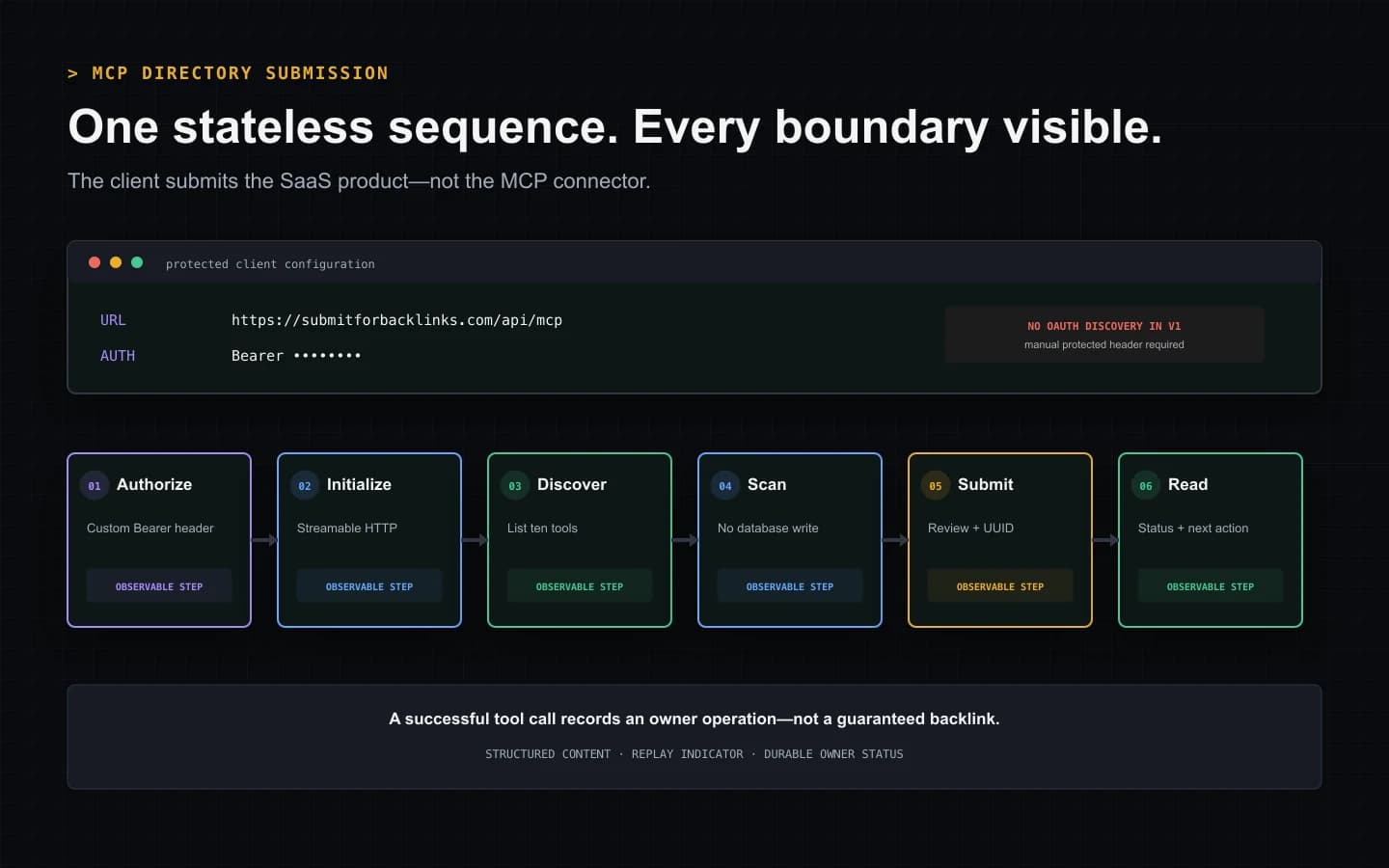
Direct answer: use MCP to submit the product, not the connector
MCP directory submission is ambiguous. Some search results describe publishing an MCP server in a connector catalog. This guide covers a different task: connecting an MCP-capable agent to SubmitForBacklinks so the agent can scan, prepare, submit, and track a SaaS product listing.
The current integration is a stateless Streamable HTTP endpoint at
https://submitforbacklinks.com/api/mcp. An authenticated client initializes
the connection, lists the available tools, scans the public product website,
shows the proposed fields for review, and calls the appropriate submission
tool. Later calls can read the saved status or manage reciprocal-badge
verification.
MCP changes the interface, not the product rules. The agent still operates for one authenticated owner. Reviewed fields, explicit attestations, Free or Featured terms, editorial moderation, and follow-up actions remain visible boundaries. A successful tool result means the service recorded that operation; it does not promise publication or a search result.
Confirm that the client supports this authentication model
The first compatibility test is not whether a client has an “Add MCP server”
button. The client must support a custom HTTP endpoint and a manually
configured Authorization: Bearer … header.
SubmitForBacklinks MCP v1 does not publish OAuth protected-resource metadata or authorization-server discovery. An unauthenticated request receives a Bearer challenge, but the client cannot complete an automatic OAuth discovery flow from that response. Create an owner API key in the signed-in Settings page, store it in the client’s secret facility, and attach it as the Bearer credential.
Do not put the key in the endpoint URL, a query string, a prompt, a committed configuration file, or analytics. The MCP authorization specification requires Bearer credentials in the HTTP authorization header rather than the URI. If the client cannot add a protected custom header, it is not compatible with this version of the server.
Authorization is optional across the MCP protocol in general. It is mandatory for this endpoint because the tools create and change owner-scoped records. That distinction prevents a misleading setup assumption: “MCP supports authorization” does not mean every host supports this server’s manual-key configuration.
Configure the exact HTTP contract
A compatible host needs these values:
{
  "name": "submitforbacklinks",
  "url": "https://submitforbacklinks.com/api/mcp",
  "headers": {
    "Authorization": "Bearer YOUR_OWNER_API_KEY"
  }
}
The property names around the URL and headers vary by host, so treat this as the value map rather than universal copy-and-paste client syntax. The MCP setup page contains the current product-specific configuration and limitations.
Requests use JSON-RPC over HTTP with Content-Type: application/json.
The Accept header must advertise both application/json and
text/event-stream, as required by the Streamable HTTP transport. This server
returns JSON responses and does not expose a separate GET event stream or
persist an MCP session identifier.
The route rejects JSON-RPC batches and request bodies larger than 64 KiB. It also validates the host and origin boundary. Those are contract limits, not transient failures to work around by changing hosts, splitting authentication across URLs, or retrying an invalid payload.
Discover ten tools before choosing a workflow
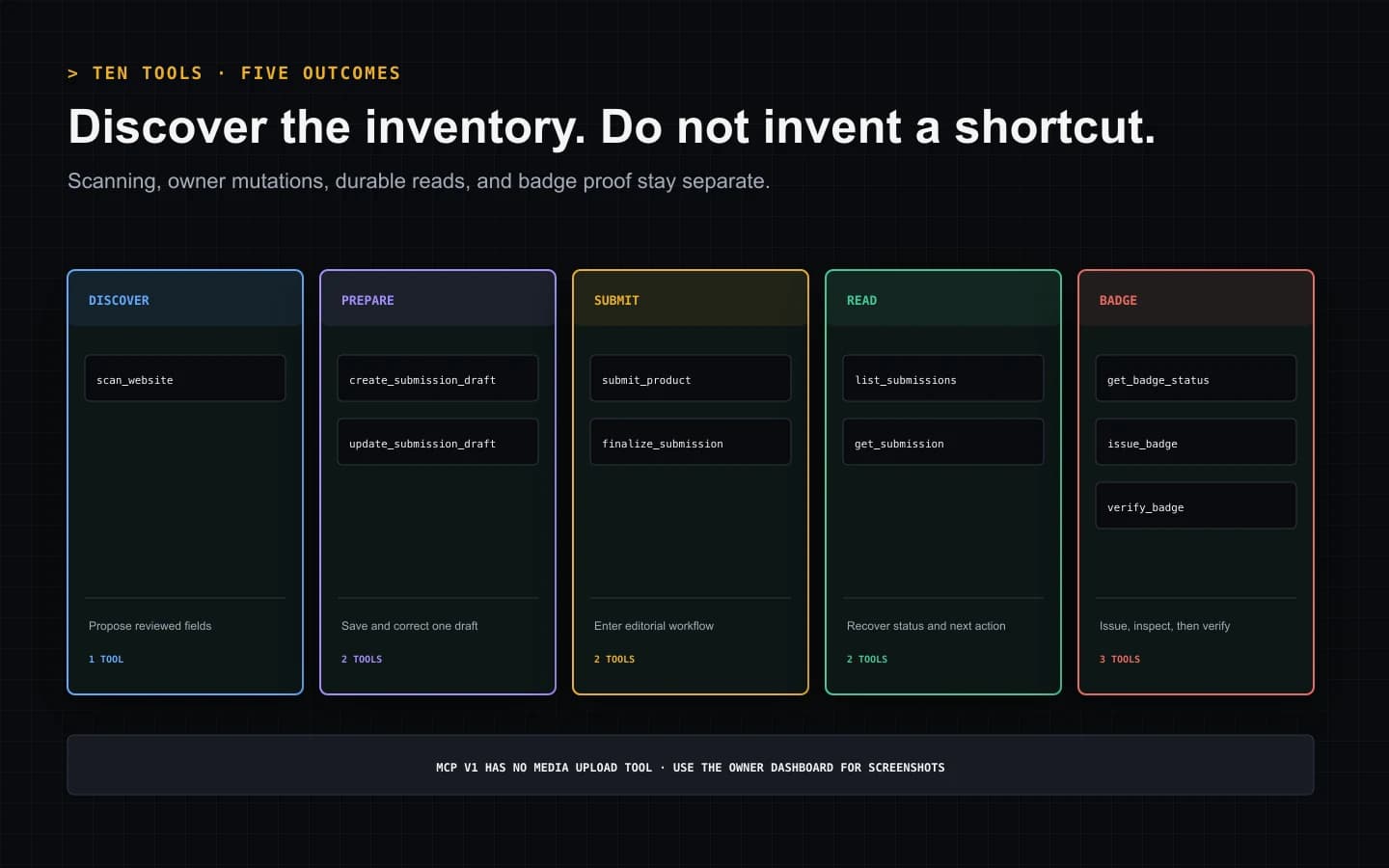
After initialization, tools/list returns ten current operations:
scan_websitereads a public product site and proposes structured fields.create_submission_draftsaves an owner-scoped record for later review.submit_productsends a complete reviewed listing to moderation.update_submission_draftreplaces all editable reviewed fields on a draft.finalize_submissionmoves a reviewed draft into the submission workflow.list_submissionsreturns the owner’s records with opaque pagination.get_submissionretrieves one owner-scoped record and its next action.get_badge_statusreads the current reciprocal-badge state.issue_badgecreates the exact badge evidence for an eligible submission.verify_badgechecks the published badge page against that evidence.
Listing the tools at runtime matters because names, schemas, and annotations
are the machine contract. A model should not invent a submit_listing call,
assume media upload exists, or reuse an example payload after the server
contract changes.
Each result includes human-readable text plus matching structured JSON in
structuredContent. Workflow results also expose an HTTP status and whether
the service replayed a prior operation. A client can display the text to a
person while using the structured form for state handling without scraping
sentences.
Choose draft or direct submission deliberately
The draft path separates preparation from the final editorial handoff. Scan the site, show the proposed facts, then save an owner draft. A person or authorized agent can retrieve it, replace the editable fields, and finalize it later.
The direct path uses submit_product. It requires all nine reviewed fields,
not only a URL and generated tagline:
- website URL;
- product name;
- tagline;
- short description;
- full description;
- primary category;
- tags;
- pricing model; and
- platform.
It also requires four explicit true attestations covering the submission guidelines, applicable reciprocal-badge terms, authority to represent the product, and review of generated content. Those declarations are not ceremonial boilerplate. They mark the point where a non-writing scan becomes an owner-authorized moderation request.
update_submission_draft replaces the full reviewed field set. It cannot
silently change the product website, listing type, or prior attestations.
finalize_submission requires a fresh operation identity and the final
attestations. If a model needs the user to review or confirm something, the
tool result should be surfaced as an action, not interpreted as permission.
Use one UUID for one mutation meaning
Writing tools require a UUID idempotency key. Generate a new key for a new draft, edit, submission, finalization, badge issue, or verification attempt when its contract requires one. If the network fails after sending a request, repeat the identical operation with the original key.
The service can replay the stored outcome for the same operation and input. A different body cannot borrow the completed key, and a new user decision must receive a new key. This prevents a transport retry from becoming a duplicate listing while keeping changed intent distinguishable from lost delivery.
Do not let the language model create a fresh key automatically after every timeout. First inspect whether the operation is pending, completed, replayed, or rejected. A new key after an unknown result can turn uncertainty into a second write.
Read the response as state plus next action
MCP tool success is not one universal “done” state. A created draft still needs review and finalization. A submitted Free listing can need reciprocal badge placement and verification. A Featured-intent listing can need secure checkout. A record under moderation requires waiting or responding to requested changes.
list_submissions returns 50 records by default and accepts up to 100. When a
next cursor is present, preserve the opaque value exactly. Do not decode it,
increment it, or assume it represents a page number.
get_submission is the reliable recovery call after a browser handoff,
timeout, or interrupted agent run. Display the saved status and the server’s
next action before offering another write. The browser dashboard remains the
durable surface for screenshots and other media because MCP v1 does not expose
a media-upload tool.
Treat badge issue and badge verification as separate facts
Issuing a reciprocal badge does not prove that the badge is live. The issue tool returns the exact tokenized markup for an eligible submission. The owner must place that markup on a visible public HTTPS page on the submitted product domain.
verify_badge then fetches the supplied page through the service’s network
safety checks and compares the delivered HTML with the issued evidence. The
workflow checks the token, accepted destination, matching badge asset, visible
markup, and link relationship. A screenshot or visually similar logo is not
equivalent to the issued badge.
Free publication and successful verification control the current time-limited dofollow entitlement. Later definitive removal or modification can return the directory link to nofollow. Temporary fetch errors are different from verified absence and should be reported as retryable rather than immediately rewritten as failure.
Map failures to one of five responses
Fix the MCP envelope. Invalid JSON-RPC, batches, unsupported methods, oversized bodies, or incompatible content headers require a client correction. Repeating the same invalid envelope is not resilience.
Replace or narrow the credential. A 401 means the Bearer credential is
missing or invalid. A scope error means the key lacks authority for that
operation. Report the exact block; never paste a key into chat or silently
request broader access.
Correct tool arguments. Missing reviewed fields, false attestations, invalid UUIDs, and malformed URLs require changed input. Tool schemas exist so the client can catch many of these mistakes before transport.
Replay only identical uncertain writes. Preserve the original key after a lost response. Respect an in-progress result or retry delay, then repeat the same call. Changed intent gets a new key.
Hand control back to the owner. Domain conflicts, unavailable Free weeks, moderation decisions, checkout, badge placement, and media upload are business or browser actions. A capable agent explains the next step instead of looping.
Choose MCP only when tool discovery is the advantage
MCP is useful when the operator already works inside a compatible agent host and wants named, schema-described tools to remain in that context. The host can discover the inventory, present tool confirmations, and combine results with its own task flow.
Use the guided CLI when one person wants the shortest end-to-end submission with browser authorization and automatic badge or checkout handoff. Use the REST API when a service needs direct control over HTTP endpoints, scopes, headers, pagination, retries, and error codes.
MCP is not inherently “more automated” than REST, and neither interface makes the submission autonomous in the sense of removing owner review. The right choice is the channel whose controls the operator can actually inspect and maintain.
Apply the listing terms after the protocol choice
A Free listing enters an available launch week and requires a verified reciprocal badge for the current dofollow treatment. A Featured listing uses a one-time checkout, skips the badge and weekly queue, remains subject to editorial approval, and enters the documented refund workflow if a paid submission is rejected.
SubmitForBacklinks currently uses standard outbound links for approved Featured listings and active verified reciprocal-badge entitlements. Google’s spam policies identify paid links that pass ranking credit and required reciprocal arrangements among link-spam examples. The product owner has accepted that policy risk.
The protocol does not change that risk and does not guarantee indexing, rankings, traffic, Domain Rating, authority, or link equity. It provides a reviewable way to request a listing and observe its real state.
MCP directory submission readiness checklist
Before enabling the server in an agent host, verify:
- The host supports Streamable HTTP with custom protected headers.
- The endpoint is the exact HTTPS
/api/mcproute. - The API key is stored as a secret and sent only as a Bearer header.
- No one expects OAuth discovery from MCP v1.
- The client initializes and calls
tools/listrather than assuming names. - Scanning remains visibly separate from writing.
- Draft and direct-submit paths are selected intentionally.
- Every direct submission includes nine reviewed fields and four attestations.
- Identical uncertain retries keep the original UUID operation key.
- Badge issuance is never reported as badge verification.
- Media and browser actions have an explicit dashboard handoff.
- Tool states are not rewritten as promises about Google or SEO performance.
That checklist is the practical boundary between a useful MCP directory submission and an agent that merely hides important decisions behind a chat response.
MCP Directory Submission Sequence
A 22-second first-party sequence showing manual Bearer configuration, MCP initialization, tool discovery, website scanning, reviewed submission, and status retrieval.
Video transcript
Configure the exact SubmitForBacklinks MCP HTTPS endpoint and store an owner API key in the client’s protected custom-header setting. This version requires manual Bearer authorization and does not publish OAuth discovery metadata. Initialize the stateless Streamable HTTP connection, then list the current ten tools instead of assuming their names. Scan the public product website without creating a record. Choose a draft for later review or submit all nine reviewed fields with four explicit attestations and one UUID mutation identity. Read the structured tool result and retrieve the durable owner status before retrying. Badge issue and badge verification remain separate operations, while media upload and commercial browser actions continue in the dashboard.
Sources and verification
Product behavior was checked against the current implementation and automated tests. External policy sources are linked directly.
- SubmitForBacklinks MCP setup and contract — checked July 30, 2026
- SubmitForBacklinks API and schema reference — checked July 30, 2026
- Model Context Protocol authorization specification — checked July 30, 2026
- Model Context Protocol tools specification — checked July 30, 2026
- SubmitForBacklinks submission guidelines — checked July 30, 2026
- Google Search spam policies — checked July 30, 2026
Put the workflow into practice
Use the guided terminal flow or review the supporting documentation before submitting a product.
Related resources
How AI Agent Directory Submission Works
See how an AI agent discovers capabilities, uses scoped authorization, saves an owner draft, submits reviewed fields, and handles each result.
Open resourceHow to Submit a Backlink From the CLI
Install the CLI with one command, scan and review your SaaS listing, choose Free or Featured, and recover cleanly if the browser handoff fails.
Open resourceHow to Use a Backlink Submission API
Build an owner-scoped SaaS listing integration with OpenAPI 3.1, reviewed fields, UUID idempotency keys, structured errors, and badge follow-up.
Open resource